In Case You Missed It: This month’s ICYMI is adapted by a piece written by Andy Goodman in December 2020. In it, we explore the age-old videoconference question: camera on or camera off?
Should I turn my camera on or off? It seems like such a simple question, perhaps even trivial, but in the pursuit of engaging and productive videoconferences, you would be surprised how critical the answer can be. For some attendees, telling them to turn their cameras on can make them feel more included, more connected to other participants, and more focused on the matter at hand. But for an almost equal number, an activated camera can feel like an invasion of privacy, an unblinking spotlight that makes them physically uncomfortable and unable to concentrate fully.
We discovered this sharp divide in the research for our report, “Unmuted: What works, what doesn’t, and how we can all do better when working together online.” We also learned that there are different ways to answer this question depending on the kind of online convening you’re conducting.
Q: Should I turn my camera on or off?
A: Yes!
The kind and size of your online convening can provide useful guidelines here, but whenever possible, let your participants decide for themselves.
There was a distinct split in our survey between those who wanted to keep their video feeds on and those who preferred having them off. The On-ers noted how it improves interpersonal communication and can contribute to a greater feeling of community. The Off-ers cited how distracting these videos can be and also how they can contribute to a loss of privacy.
When I spoke with Matt Claps of Casey Family Programs, he diplomatically captured both sides of this split: “It’s part of [Casey’s] culture to recognize we’re working in someone’s personal space, so we allow people to turn off cameras and mute,” he said during our Zoom interview. “But that does present a challenge of losing the nonverbal communication you usually have when you can see the person you’re speaking with.”
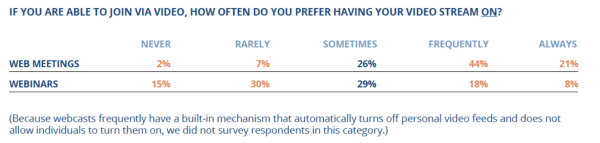
With valid arguments on both sides, how should online convening leaders and facilitators handle this choice? The category and size of your convening can offer some help. Since web meetings tend to be smaller gatherings and usually thrive on high levels of interaction among the participants, these would appear to be times to ask participants to leave their videos on, and our survey respondents agreed: 65% preferred having their videos on frequently or always, and only 9% preferred them on rarely or never during web meetings.
Given a choice of five reasons for preferring videos stay on (with the option to select all that applied and also to enter other reasons not listed), respondents prioritized their reasons as follows:
1. It makes it easier to interact and communicate (84%)
2. It helps me stay focused (60%)
3. If I see other videos on, it feels rude to have mine off (59%)
4. It makes me feel less isolated and more part of a group (57%)
5. It’s required/requested by the facilitator (19%)
Among the “other” reasons respondents provided, noteworthy examples included:
- “As a leader in my organization I feel it’s appropriate to demonstrate to others that I am ‘present.’”
- “I want my supervisors to see that I’m engaged.”
And my personal favorite:
- “You don’t put a paper bag on your head when you meet in person.”
Since webinars often involve larger groups, they would seem to function more smoothly with personal videos turned off, and respondents clearly leaned in this direction: only 26% preferred them on frequently or always, and even more telling, 45% — five times the number of web meetings attendees – said they rarely or never leave their video on.
Given a choice of four reasons for preferring to leave their video off (again with the option to select all that applied and also to enter other reasons not listed), respondents prioritized their reasons as follows:
1. Prefer not to worry about my appearance/attire/background (68%)
2. I’m distracted by my own video (36%)
3. It makes me self-conscious (35%)
4. It’s physically uncomfortable to have to stay within the video frame (27%)
Nearly 40% of respondents who answered this question volunteered other reasons to add to this list, with “bandwidth issues,” “concerns over privacy/security,” “not wishing to be seen multi-tasking,” and “no added value” leading the way.
RECOMMENDATIONS
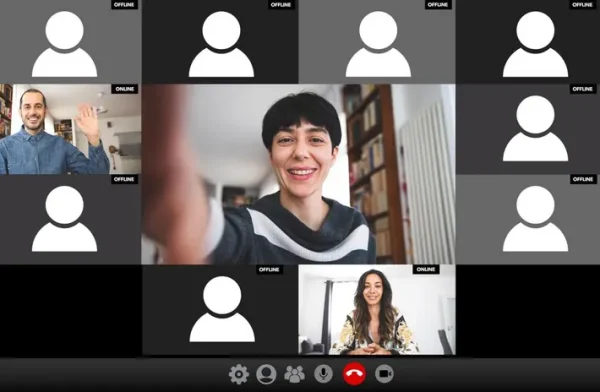 This on/off debate should not be reduced to an either/or proposition. The data for web meetings strongly suggests these are occasions to ask everyone to turn their feeds on, just as the data for webinars indicates that a sizable part of your audience would prefer to leave them off for that kind of convening.
At The Goodman Center, we strive to have the best of both worlds within a single convening. When we begin a webinar (which will usually involve 20-25 participants), we ask everyone to join with their videos on so we can welcome them, and so they can see who else is attending. Once the class is underway and we begin teaching, we ask participants to turn their videos off so we can all focus on the content (which almost always involves PowerPoint slides.) When we stop periodically for questions or discussion, we ask participants to turn their videos on again so everyone can see who’s speaking.
Every request to turn video feeds on or off, however, comes with the option to decline. First and foremost, we believe that people work best and learn more when they feel comfortable and safe. In virtual settings, that feeling begins with how they want to be seen…or not. In addition, be aware that race, gender and age can also affect how individuals approach this decision:
- While 65% of all respondents prefer to keep their videos on during meetings, a noticeable smaller percentage of people of color (55%) expressed this preference during meetings.
- Men are more likely than women to prefer having video on during meetings by a small but statistically significant margin: 25.4% to 19.5%.
- Younger participants are much more likely to feel it’s rude to have their videos off when others have them on when compared to older participants: 77.1% for twenty-somethings versus 49.4% for participants 60+.
Finally, we must all acknowledge the fact that participants in our meeting may be attending many online convenings that day and may simply get tired of being “on camera.” We noted many comments along these lines in our survey, and one in particular jumped out: “My boss makes us keep our video on. I’m on video 5-7 hours a day. It is exhausting. I hate looking at myself all day and fake smiling during Zoom meetings. My head hurts every day. Please make it stop.”
The least we can do is offer that option.
To learn more ways to engage audiences, register for our “Meetings for People Who Hate Meetings” Workshop on May 13 & 15.